

Updated November 15, 2026. Canadian prices as of that date, before taxes.
The first wheel often shows up before the cockpit. There's the computer desk, a chair, and not much room for a structure that would stay set up for good. So the question comes naturally: will a direct drive base hold on a desk, or do you need a cockpit from day one?
Right off the bat: a solid desk is enough for an entry-level base, up to about 6 Nm. Bundles like the Moza R3, the PXN VD6 and the Thrustmaster T598 actually ship with a table clamp. The more torque you add, the more the desk becomes the weak link, and around 8 Nm it's time to think about a wheel stand or a cockpit.
In this article, you'll learn:
- How a table clamp works and what it asks of your desk
- Up to what torque a desk is still a good option
- How to set up the wheel and pedals for comfortable driving
- The signs it's time to move to a cockpit
- The bundles that mount on a desk straight out of the box
How a table clamp works
A table clamp sandwiches the desktop. A plate sits on top and holds the base, then two jaws tighten against the underside with hand knobs. Nothing gets drilled and everything comes off in a few minutes, which matters in a rental or when the desk has to be a desk again on Monday morning.
Moza's clamp is a good example. It's CNC-machined from 5 mm steel, installs without tools and takes a desktop up to 50 mm thick. Moza lists it as compatible with its R3, R5, R9 and R12 bases, and says it's built to withstand the torque of an R21. That figure shows the clamp itself is rarely the problem: the furniture you clamp it to decides how well it holds.

What the clamp asks of your desk
Before you order, look under your desk. You need a free edge of at least a few centimetres, with no drawer, crossbar or metal frame keeping the jaws from closing. Thickness matters too: past 50 mm, the Moza clamp won't close.
The material makes a big difference. A solid wood or thick plywood top handles the clamping force well. Melamine-covered particleboard, very common on entry-level desks, can crush under the jaws over time. A small piece of wood slipped between the jaw and the underside of the top spreads the pressure and protects the furniture. Avoid glass, and be wary of motorized standing desks: their columns already sway when you type, so a wheel pulling at every corner will move them even more.
Up to what torque a desk is still a good option
A direct drive base pushes the wheel with real force, and that force goes back into the desk. On light furniture, part of the force feedback is lost in the flex of the top, and the vibrations make the monitor next to it shake. That's why the base's torque is the first thing to look at when choosing between a desk and a dedicated structure.
| Base torque | On a desk | What we recommend |
|---|---|---|
| Up to 6 Nm | Good option on a rigid top | Table clamp, monitor on a wall or arm if possible |
| 6 to 8 Nm | Doable, but the desk starts to move | Very heavy desk or foldable wheel stand |
| 8 to 12 Nm | The desk limits the feel | Solid wheel stand or cockpit |
| Over 12 Nm | Avoid | Aluminium profile cockpit |
General guidelines for a standard home or office desk. A heavy solid top pushes these limits a little, a light desk lowers them.
These thresholds match our guide Direct drive wheel: how many Nm do you need?. Peak torque matters too. The Thrustmaster T598 has 5 Nm of constant torque but can briefly reach double that on a kerb or a contact; the PXN VD10 is rated at 10 Nm constant and 12 Nm peak. Those spikes are what shake the desk, and they're what separates furniture that holds from furniture that follows the wheel.
A simple test once the base is installed: start a race, drive over a kerb with force feedback at your usual setting, and watch your monitor. If it barely trembles, your desk is doing the job. If it moves enough to bother you, lower the force a little or move the monitor off the desk before deciding you need a cockpit.
Setting up the wheel and pedals for comfortable driving
Wheel height
Most desks are a bit high for sim racing. Once the base is clamped to the top, the centre of the wheel often ends up at chin height, when you want it closer to your chest, arms slightly bent. Raise your chair if you can, or use the side holes on the Moza clamp, designed to mount the base lower on a desk that's too high. Sit close enough that your wrists rest on top of the wheel when your shoulders touch the backrest.
Pedals that slide away
This is the real weakness of a desk setup, much more than the wheel. On the floor, the pedals slide forward every time you brake, and a chair on casters rolls back while you push. A thick non-slip mat under the pedals, the pedals braced against the wall or a desk leg, and a chair without casters, or with locked ones, solve most cases. Our pedal guide explains why a load cell pedal set needs an even firmer seat: you brake by pushing hard, and that force has to go somewhere.
Monitor and cables
If your monitor sits on the same desk, it will pick up the base's vibrations. A wall-mounted monitor arm, or simply a little distance between the base and the monitor stand, makes a clear difference. Also route the base's power cable along the back of the desk, away from your legs: you don't want a foot movement to unplug it mid-race.
Signs it's time to move to a cockpit
A desk is a good starting point, and plenty of drivers race on one for months. Some signs show it has reached its limit, though. You lower the force feedback so the desk stops moving. You retighten the clamp every session. You want a stronger base, or a load cell pedal set that pushes you back in your chair. Or you spend more time setting up and taking down your rig than driving.
You then have two options. A foldable wheel stand holds the base and pedals on one structure, without a seat, and stores against a wall: it's the right compromise when the room has other uses. A full cockpit, in aluminium profile or tube, keeps the base, pedals and seat perfectly aligned and doesn't move at all. 6Sigma cockpits start at $499, and our guide Sim racing cockpit: how to choose compares the three families in detail.
Good news: the base you buy today for your desk will follow you to the cockpit. Direct drive bases bolt to a cockpit plate just as they do to a clamp, and according to Moza, part of its clamp can even be reused to mount on aluminium profile.
Bundles that mount on a desk straight out of the box
If you're starting from scratch, a bundle with base, wheel and pedals saves you from buying the mount separately. Three of our bundles ship with a table clamp and stay in the range where a desk does the job well.
The Moza R3 ($399 for the PC version) is the gentlest of the three, at 3.9 Nm. It includes the ESX wheel, the SR-P Lite pedals with Hall sensors and the table clamp. It's the simplest choice for a lighter desk. An Xbox and PC version also exists, depending on availability.
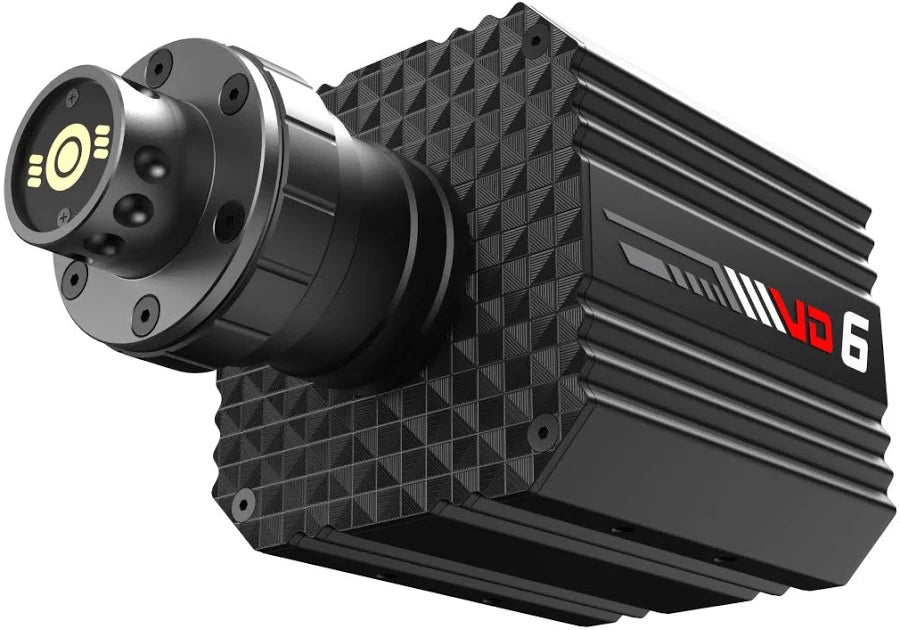
The PXN VD6 bundle ($615) goes up to 6 Nm, with a 280 mm wheel with a rev LED bar and metal pedals with Hall sensors. The desk clamp is included. At about 11.5 kg in total, it calls for a solid desk, but it stays in the comfortable zone.
The Thrustmaster T598 ($699) is the only one of the three that works on PS5, with 5 Nm of constant torque and overshoot that can double it on impacts. The bundle includes the mounting system; if you buy the base alone, Thrustmaster sells its desk mounting kit separately. With its torque spikes, it's the one that will benefit most from a thick top.
Already have a Moza R3, R5, R9 or R12 base without a clamp? The Moza table clamp ($66) takes care of it. To compare bundles on more than installation, see our guide Best budget direct drive wheel, and for the full budget of a setup, our sim racing simulator cost guide.
In short, a rigid desk and a table clamp let you drive direct drive without a cockpit, as long as you stay around 6 Nm, check the underside of the top and deal with pedals that slide. The cockpit will come the day your desk keeps you from enjoying your base, and that base will come with you. If you're unsure about your desk or your first bundle, write to us with a photo of the underside of your desktop, or drop by our store.
FAQ
Can you put a direct drive base on a desk?
Yes, with a table clamp and a rigid top. Up to about 6 Nm, a solid desk does the job well. Past 8 Nm, the desk starts to flex and vibrate, and a wheel stand or cockpit becomes the better choice.
Does the Moza table clamp work with my base?
Moza lists it as compatible with the R3, R5, R9 and R12 bases, on a desktop up to 50 mm thick. It installs without tools or drilling, and Moza says it's built to withstand the torque of an R21.
How do I stop my pedals from sliding on the floor?
Put them on a thick non-slip mat and brace them against the wall or a desk leg. Use a chair without casters, or lock them, so you don't roll back when you brake.